


Happiest Baby, makers of SNOO
3.4643.00 Reviews
App Specs
- Version
- 3.0.3
- Updated On
- License
- Free
- Downloads
- 100,000+
- Developer
- Happiest Baby, Inc.
- Categories
- Parenting
- Platform
- Android
Screenshots
 Analysis by AppCompare
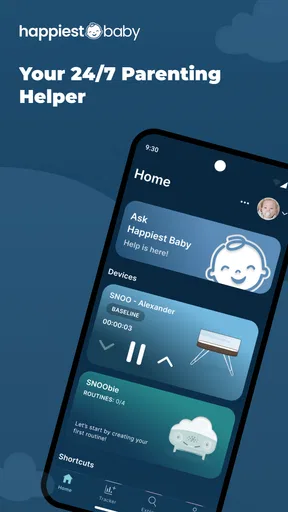
When a baby wakes and the household is running on very little sleep, a phone app can feel like one more thing to manage—or a useful way to stay connected to a smart bassinet. Happiest Baby is the parenting app from Happiest Baby, Inc., built as the mobile companion for SNOO and SNOObie. I’d think of it less as a general-purpose baby tracker and more as the control point for families who already use those products. That distinction matters: if you’re deciding whether to download it, the first question is whether it fits the sleep setup you actually have.
Where people can get stuck
The app’s role is easy to misunderstand because its name sounds broader than its main purpose. It replaced the SNOO App, so existing SNOO families may be looking for a familiar companion under a new name. If you came here expecting a standalone sleep tracker that can run a baby’s bedtime routine without compatible Happiest Baby equipment, you may find the fit disappointing. I’d make that distinction before spending time configuring an account or changing a routine.
There can also be a human-factor snag: the person holding the phone at night may not be the person who set things up. In a tired household, unclear handoffs can lead to repeated checks, uncertainty about whether the app is connected, or two caregivers changing settings without agreeing on what they want. My practical suggestion is to decide together who handles routine adjustments and what you’ll do if the phone isn’t available. That simple conversation can prevent the app from becoming another source of midnight debate.
Setup checks that save frustration
I’d begin with the basics rather than assuming a problem with the app itself. Confirm that you have the right companion app for your SNOO or SNOObie, that the phone can reach the device through the connection method your setup uses, and that both are ready for normal use. Keep the phone close during the first setup, follow the in-app instructions, and avoid changing several settings at once. If something behaves differently than expected, changing one thing at a time makes it easier to see whether the issue is resolved.
Version details can help when you’re diagnosing a problem with support or comparing what appears on your screen: this app is currently at version 2.9.7 and requires Android 10 or later. It’s free to download, though in-app purchases are listed at $19.99 per item. I wouldn’t treat the download price as the whole cost of using the ecosystem; the app’s practical value depends on the compatible product you already own or plan to use. The app is rated for Everyone, which describes its store age rating rather than a promise that every feature is suitable for every family situation.
Recovering a routine when something goes wrong
Suppose you’ve settled the baby, opened the app, and can’t get the response you expected. I’d first pause before tapping repeatedly or adjusting multiple controls. Check whether the phone is still connected as expected, then return to the app and review the current settings. If the issue persists, close and reopen the app, check that the phone’s connection is working, and consult the product’s instructions before trying anything more involved. Those are sensible general checks, not a guarantee that every connection or device issue can be fixed from the phone.
A useful household workflow is to keep the routine predictable: one caregiver checks the app, makes any intended adjustment, and tells the next caregiver what changed. If a screen or control doesn’t match what you expect, use the manufacturer’s help resources instead of guessing at a setting while holding a tired baby. I value that restraint. A companion app should make a familiar setup easier to manage, not encourage frantic experimentation when the child needs attention.
Worth Reading Before You Choose

EA SPORTS FC Mobile 26 Is a Bigger Football Game, but It Takes Time

Flipboard Shows What News Apps Must Do Beyond the Feed

Switching to Android Auto Means Rethinking Your Driving Routine

Google Calendar Makes a Crowded Week Easier to Manage

Ludo King Makes the Most of the Minutes Between Plans

Baby Panda World Brings Quick Play to Modern Phones, but Its Game Library Feels Busy
When the app may not be the cause
Not every difficult night points to a software fault. A baby can remain unsettled even when the app and connected product are working normally, and an app cannot replace attentive care or advice from a qualified health professional. If the baby seems unwell or you have a safety concern, put the phone aside and seek appropriate help. I would also avoid treating sleep information as a diagnosis or as proof that a particular setting is right for every child.
It’s worth separating three questions: can the phone communicate with the product, is the product responding as expected, and is the baby settling? A problem with one does not automatically explain the others. If the app appears responsive but the device does not, check the product’s own guidance; if the device is operating but the baby is still upset, focus on the baby rather than repeatedly changing app controls. This distinction is especially helpful when several tired people are trying to troubleshoot at once.
How Happiest Baby fits into a family’s sleep setup
I’d treat this app as one part of a family’s existing sleep setup, not as a substitute for deciding how caregivers will share nighttime duties. In my view, agreeing in advance on who checks the phone and who handles changes can make the routine calmer when everyone is tired. That practical handoff is worth sorting out before relying on the app during a difficult night.
What is the SNOO All About?
So, what's the buzz about the SNOO? It's not just any bassinet; it's a smart sleeper designed to help your baby—and you—get more shut-eye. Created by Dr. Harvey Karp, the guy who brought us the “5 S’s” for calming babies, the SNOO is all about combining science and technology to make parenting a tad bit easier. It promises to automatically respond to your baby's fussing by rocking them back to sleep. Sounds dreamy, right?
That context explains why the app is different from the usual alternatives in the parenting category. A conventional baby log focuses on recording feeds, naps, or changes you enter yourself; this companion is most relevant when you’re managing Happiest Baby equipment. A general sleep-tracking app may suit parents who want records without a particular bassinet, while this one makes more sense when the connected product is already part of the routine. I wouldn’t download it expecting a replacement for every family’s preferred tracking method.
Setting Up and First Impressions
Setting up the SNOO was surprisingly straightforward. Even if you’re not the most tech-savvy person, you’ll find the instructions clear and easy to follow. Once assembled, the bassinet looks sleek and modern—definitely a cute addition to any nursery. The design makes it feel like a futuristic gadget, and honestly, it’s pretty exciting to see it in action for the first time.
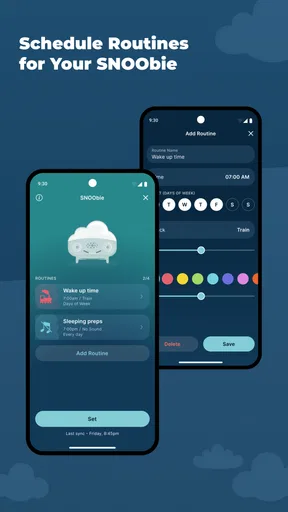
For the app itself, I’d approach setup with a practical goal: get the basic connection working before exploring every option. A non-obvious but useful tip is to test the handoff between caregivers while everyone is calm, not during the first difficult night. Each person can learn where to check the current setup and agree on which changes are intentional. If you’re setting up the product before the baby arrives, that quiet practice run can reveal whether the phone workflow feels clear enough for a sleep-deprived moment.
Features That Make a Difference
Alright, let’s dive into the cool features. The SNOO comes with a unique swaddle that securely attaches to the bassinet, keeping your baby safe on their back—something that’s super important for reducing SIDS risk. It also has a built-in white noise machine that adjusts its sound based on your baby’s cries. The bassinet’s gentle rocking motion is meant to mimic the womb, helping soothe babies back to sleep.
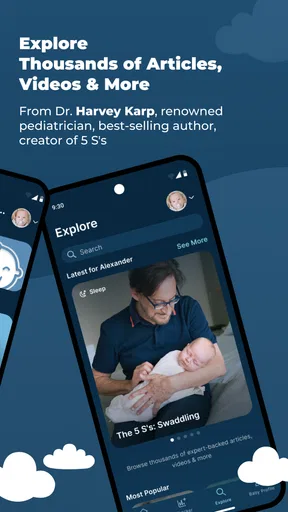
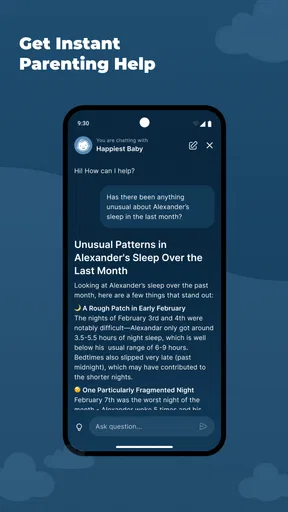
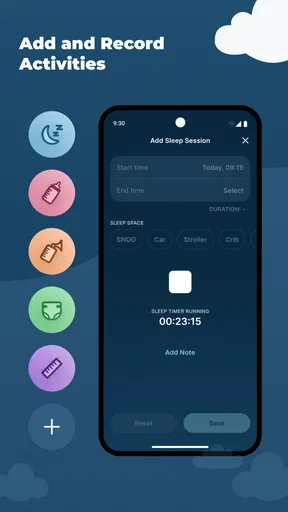
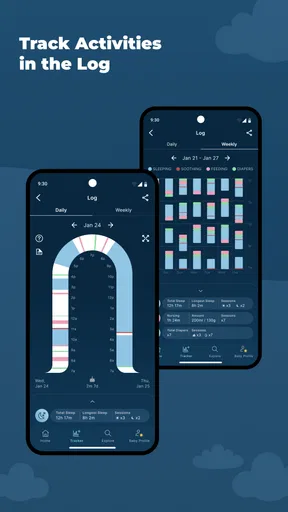
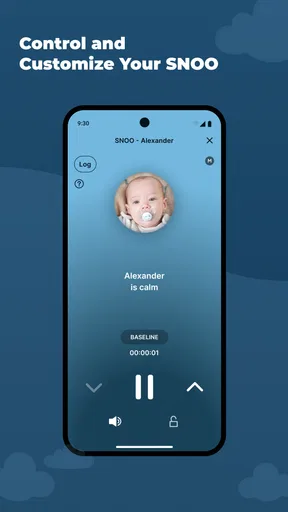
The accompanying app is another highlight. You can control the SNOO from your phone, adjusting settings and tracking your baby’s sleep patterns. It’s like having a sleep coach right in your pocket. Plus, the app gives you tips and insights based on Dr. Karp’s methods, which is a nice touch for first-time parents.
One trade-off I’d keep in mind is that convenience can turn into over-monitoring. If you find yourself opening the app after every sound or checking sleep patterns when you should be resting, the extra visibility may be adding stress instead of easing it. I’d use the information to support a routine, not to judge a single night or compare one baby’s sleep with an ideal. Families who prefer to keep phones out of the nursery may be happier with a simpler setup and fewer app checks.
The Real Test: Baby’s Reaction
Now, the million-dollar question: does it work? In short, yes, but with some caveats. Many parents report that the SNOO significantly improves their baby’s sleep. The responsive rocking and white noise seem to work wonders for babies who have trouble settling down. However, some little ones may take longer to adjust than others. It’s not a magic bullet, but it does offer a noticeable improvement for many families.
A realistic use case is the evening shift change. One parent has been handling the early part of the night, and the other takes over later. Rather than starting from scratch, the next caregiver can use the companion app as part of the established SNOO routine, while still checking the baby directly and following the family’s agreed approach. The benefit is less about eliminating every wake-up and more about making the equipment easier to manage consistently. If a baby doesn’t respond as hoped, that doesn’t necessarily mean the app is broken or that a parent has used it incorrectly.
The app is likely most useful for families already committed to the SNOO or SNOObie, especially when more than one caregiver needs to understand the same setup. It is less compelling for parents who want a device-neutral log, dislike managing routines on a phone, or are looking for a standalone solution without compatible equipment. In those cases, a notebook, shared calendar, or ordinary tracking app may be a better match because it doesn’t tie the workflow to this product family.
Things to Keep in Mind
While the SNOO is fantastic, it’s not for everyone. The price tag is hefty, which can be a deal-breaker for some families. However, considering it as an investment in your sanity might make it worth it. Also, some parents find that the transition from the SNOO to a regular crib can be tricky, so it’s something to plan for as your baby grows.
Another thing to consider is that the SNOO is only usable until your baby is about six months old, or until they can push up on hands and knees. After that, you’ll need to think about the next steps in your baby’s sleep journey.
The app’s catalog footprint is modest compared with the broadest parenting tools: it has over 50,000 installs and an average rating of 3.3 from around 1,700 ratings, with 598 written reviews. I take that as a reason to approach it as a specific companion rather than a universally loved must-have. A middling score can reflect very different expectations: some families may value device control, while others may want a free-standing tracker or may be frustrated when a connected workflow doesn’t suit them. The app itself is free, but the listed $19.99 in-app items are worth noticing if you’re budgeting; I’d check what a purchase is for before committing.
One question people often have is whether this replaces every other baby app. I wouldn’t assume so. Its clearest role is as the mobile companion for SNOO and SNOObie, while families may still prefer a separate way to record information that matters to them. Another practical question is whether it can make an unsettled baby sleep on demand: no app can promise that. Think of it as a way to manage the compatible setup, not as a guarantee of longer nights or a substitute for responding to your child.
Final Thoughts
In the end, Happiest Baby has crafted a truly innovative product with the SNOO. It’s a blend of technology and parenting wisdom that offers a helping hand during those challenging early months. While it might not be a perfect fit for every family, those who can afford it and find it effective often rave about the extra hours of sleep they get.
So, if you’re considering giving the SNOO a try, weigh the pros and cons, and see if it aligns with your parenting style and budget. Who knows? It might just be the sleep solution your family has been dreaming of.
My practical verdict is that the app makes the most sense when the equipment is already central to your nights and you want a shared, phone-based way to manage it. Happiest Baby, Inc. released it on November 8, 2022, and it remains a focused parenting tool rather than a broad baby-care hub. If that narrow role matches your household, I’d give it a fair try while keeping expectations realistic. If you need a flexible tracker that works independently of SNOO or SNOObie, I’d choose a different option and keep your bedtime routine simpler.
Pros
- Soothing white noise improves baby sleep.
- Easy-to-use interface for sleep tracking.
- Customizable settings for individual needs.
- Promotes safe sleep with built-in features.
- Bluetooth connectivity for remote control.
Cons
- High price point may deter some users.
- Requires consistent Wi-Fi for full features.
- Limited battery life without power source.
- App updates can be inconsistent.
- Not compatible with older smartphone models.
FAQs for Happiest Baby, makers of SNOO
What is the SNOO Smart Sleeper and how does it work?
The SNOO Smart Sleeper is a responsive baby bassinet designed to improve sleep for both infants and parents. It uses a combination of gentle rocking motions and soothing white noise to mimic the environment of the womb, helping babies sleep longer and more peacefully. The SNOO automatically responds to your baby’s cries with increased motion and sound to calm them back to sleep.
Is the SNOO safe for newborns?
Yes, the SNOO is designed with safety in mind. It features a unique swaddle that secures the baby on their back, which is the recommended sleep position to reduce the risk of Sudden Infant Death Syndrome (SIDS). Additionally, the SNOO’s mesh walls provide optimal airflow, and its responsive technology ensures gentle, appropriate soothing to avoid overstimulation.
Can parents control the SNOO settings?
Absolutely, parents can control the SNOO through its companion app, available on both Android and iOS. The app allows you to customize various settings such as the level of sound and motion. It also provides sleep tracking and insights to help you understand your baby's sleep patterns better. This gives parents peace of mind and flexibility in managing their baby's sleep environment.
What age range is the SNOO suitable for?
The SNOO is designed for babies from birth up to six months, or until they can get on their hands and knees. This typically aligns with the period when babies begin to outgrow bassinets and transition to cribs. The SNOO helps during the critical early months when establishing healthy sleep patterns is essential for both the baby and parents.
Is the SNOO easy to set up and use?
Yes, the SNOO is designed for convenience and ease of use. It comes with clear instructions and requires minimal assembly. Once set up, its intuitive interface and companion app make it easy for parents to operate. The SNOO’s hassle-free design allows parents to quickly adjust settings and monitor their baby's sleep with ease, making it a practical choice for busy new parents.


